

Virtual Scrolling Engineering: Three Production Cases
Virtual scrolling has been a recurring area of my frontend work for many years.
It first appeared as a performance problem: how do you display tens of thousands of records when rendering the complete DOM is prohibitively expensive? Later, it became an architectural primitive that I could reuse for editable tables, selectors, tree structures, and other large data sets. In AlekLabs Eye Trainer, the same underlying idea evolved further into a document-layout engine capable of working with large books, text lines, PDF pages, and other content.
These systems all use virtual scrolling, but their constraints are substantially different.
The first case required variable row heights that had to be calculated as quickly as possible. The second shifted the complexity toward editing, component composition, selectors, and tree structures. The third moved beyond conventional tables entirely and made virtualization part of a large-document rendering and layout system.
Dignio Prevent: Variable-Height Virtual Tables
My first substantial virtual scrolling implementation was developed at Dignio.
One of the first questions I was asked after joining the company was whether I could optimize its tables. The application was built with AngularJS, and some APIs returned complete datasets without backend pagination. Rendering every record immediately meant creating a large AngularJS-controlled DOM tree, which became increasingly expensive as the number of records grew.
Backend pagination was not available as a general solution, so the frontend had to be able to work efficiently with the complete dataset.
The solution was a custom virtual table.
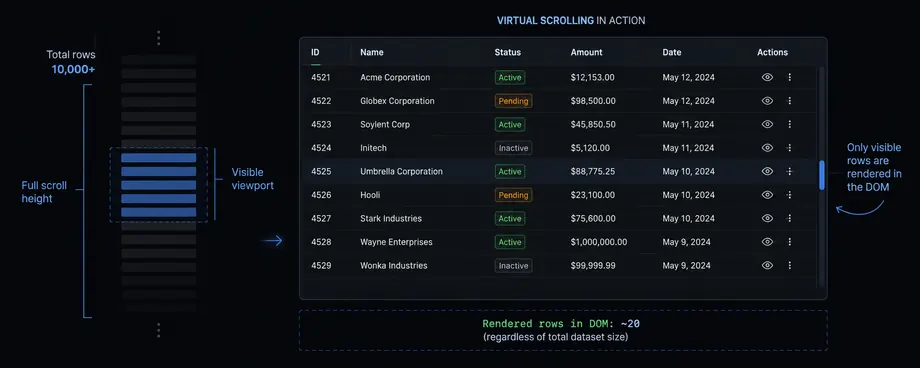
Only the rows required for the visible viewport were mounted into the main DOM, while the scrolling geometry represented the full dataset. From the user's perspective, the table had to behave as if every row had been rendered normally.
The difficult part was that row height was not known in advance.
Cells could contain different types of content, including text and HTML-based representations, and their resulting heights affected the height of the entire row. To reproduce the geometry of a fully rendered table, the virtual scrolling engine therefore needed to determine the layout of potentially thousands or tens of thousands of cells without paying the cost of inserting all of them into the live DOM.
A significant part of the work became an optimization problem around cell measurement.
For text cells, the layout code could calculate text dimensions and line wrapping in JavaScript instead of constructing every corresponding DOM node merely to ask the browser for its height. Character widths, available cell width, wrapping rules, and cached measurements were used to determine the resulting geometry as efficiently as possible.
Computed data was aggressively cached because many cells shared the same formatting and because recalculating unchanged layout during every table operation would have defeated much of the benefit of virtualization.
This made the implementation different from the relatively simple fixed-row-height virtual lists commonly used in application interfaces. The system first had to establish enough information about the complete table geometry to know where every row belonged, while rendering only a small fraction of those rows.
The table gradually became much more than a scrolling optimization.
It eventually supported functionality such as:
- column sorting;
- column reordering;
- configurable columns;
- adding and removing visible columns;
- filtering;
- different cell renderers;
- variable row heights;
- large dynamically changing datasets.
Filtering was integrated with Crossfilter, which was already part of the application and provided efficient client-side filtering over the loaded data.
Most of the table engine itself was implemented in plain JavaScript rather than making its internal algorithms dependent on AngularJS. AngularJS acted primarily as the integration layer around it.
This distinction was important for performance. The expensive data processing, layout calculations, caching, and virtualization logic could remain outside AngularJS's normal rendering machinery, while an AngularJS directive exposed the table to the rest of the application.
The internal architecture also became increasingly modular.
Table capabilities were organized as optional features that could attach behavior through hooks into different lifecycle stages of the table. A feature could, for example, extend column-header behavior without requiring the core table implementation to contain every possible variation.
This resulted in a feature-oriented architecture built around lifecycle hooks and events rather than one increasingly large table class containing all behavior.
Over time, the table became one of the central UI components of Dignio Prevent. Patient lists, tasks, events, activity data, and other major areas of the application depended on it.
Some datasets were particularly demanding because the backend returned very large collections as a single response. In such cases virtualization did not merely make scrolling smoother; it was what made displaying the dataset practical in the browser at all.
This project established several ideas that I would reuse later:
virtualization is only one part of the problem; understanding and predicting layout can be equally important.
Luqon BOOST: Virtual Tables as UI Infrastructure
Years later, I encountered the same general problem in BOOST at Luqon, but the requirements were different.
BOOST is a large Vue 3 and TypeScript enterprise application. Instead of continuing to depend on a third-party data table, I implemented a custom table as part of the application's internal UI framework.
This time I could design the system around modern Vue 3 reactivity and TypeScript from the beginning.
For the primary virtualized use cases, row height was known in advance. This eliminated much of the expensive geometry discovery required by the Dignio implementation. Calculating the total scrollable height and mapping a scroll position to visible rows was therefore considerably simpler.
The engineering complexity moved elsewhere.
The BOOST table was designed not only for displaying data but also for editing it.
Cells could contain normal values, custom renderers, input components, selectors, and other Vue components supplied through the table's rendering abstractions and slots. The table therefore became part data grid, part form infrastructure.
It supported functionality including:
- virtual scrolling;
- editable cells;
- custom cell components;
- typed cell representations;
- keyboard interaction;
- dirty, saved, and error states;
- row insertion and deletion;
- row movement;
- selection and batch operations;
- sorting;
- configurable columns;
- search highlighting;
- readonly and editable modes.
Virtualization therefore had to coexist with persistent application state, editing state, focus management, component lifecycles, and navigation between cells.
An important development was that the virtual table did not remain an isolated component.
It became the foundation for a hierarchy of higher-level components.
For example, autocomplete functionality was reused inside select controls. Select functionality was extended into table-based selectors capable of displaying several columns. These selectors could then use the same virtual table engine internally.
As a result, virtualization was no longer limited to full-page data grids.
A selector containing thousands or even tens of thousands of records could remain inexpensive to render because opening the dropdown did not require Vue to mount thousands of option components. The complete collection could exist in memory while only the currently visible portion was represented by UI components.
The same architecture was extended to hierarchical data.
I implemented a tree-table layer in which the table itself continued to consume a flat sequence of visible rows, while a tree data source maintained the underlying hierarchical structure.
Expanding or collapsing a node changed the flattened visible representation supplied to the table. The virtual scrolling layer therefore did not need special knowledge of the entire tree hierarchy: it continued to work with the same linear row model.
The table provided the UI necessary to display and manipulate expandable parent nodes, while the tree layer controlled which descendants belonged in the current flattened view.
This separation allowed the same tree-table functionality to be reused in selectors as well.
The resulting component hierarchy included related forms of:
autocomplete → select → table select → tree table / tree select
rather than implementing each of these controls independently.
Large selectors, hierarchical selectors, normal data tables, and editable enterprise grids could therefore reuse the same underlying infrastructure.
Client-side filtering again played an important role. BOOST uses a Crossfilter-based filtering system for large locally available datasets, allowing users to filter and search records without requiring a backend request for every interaction.
In this project, virtual scrolling became more than a performance technique.
It became a reusable UI infrastructure layer.
The table could be embedded into pages, forms, selectors, and hierarchical components, while the rest of the application reused the same rendering, navigation, filtering, and data abstractions.
AlekLabs Eye Trainer: Virtual Scrolling as a Document Layout Engine
The third case comes from my personal project, AlekLabs Eye Trainer.
Here the problem is no longer a conventional data table.
AlekLabs Eye Trainer needs to display books, and books can contain very large amounts of text. Rendering an entire novel as one large DOM structure is unnecessary and increasingly expensive as document size grows.
More importantly, AlekLabs Eye Trainer allows the user to change parameters such as text width and font size while reading.
Changing one of these values changes line wrapping throughout the document.
The application therefore needs to answer two separate questions efficiently:
- Which content should currently be rendered?
- Where does the current reading position move after the entire document layout changes?
This made virtual scrolling a natural part of the architecture.
Only the lines around the current viewport need to be rendered. At the same time, the engine maintains a logical representation of the complete document so that the scrollbar and reading position correspond to the full book.
The challenging part is layout calculation.
When the width or typography changes, line boundaries across potentially megabytes of text may change. The application therefore needs to determine the new line structure extremely quickly.
In some respects this brought me back to the Dignio problem.
There I needed to determine the dimensions of thousands of text cells without rendering an entire table. In AlekLabs Eye Trainer, the same class of optimization appears at document scale: calculate where text wraps and where lines begin and end without constructing the entire book in the DOM first.
The implementation has gone through several generations.
This was not an algorithm written once and considered finished. Each iteration reduced the amount of work required to determine line boundaries and improved the speed of complete book relayout.
The virtual model is organized around paragraphs and resulting visual lines. The renderer then works with the small subset of those lines required for the current viewport.
This also makes changing the reading layout fundamentally different from rerendering a normal static document.
The engine knows the reader's logical position in the text. After a new layout is calculated, it can map that logical position into the new sequence of visual lines and keep the relevant content inside the viewport.
Virtual scrolling therefore participates directly in preserving reading position.
I also experimented with moving parts of the layout calculation to Rust compiled to WebAssembly.
The experiment was useful, but it demonstrated an important limitation of applying WASM to this particular architecture.
Moving an isolated function to Rust does not automatically make the complete operation faster. If large strings and layout data repeatedly cross the JavaScript/WASM boundary, the integration overhead becomes significant.
To gain the full benefit, a much larger part of the document engine - including its text and internal data structures - would need to live inside WebAssembly memory.
That would turn a targeted optimization into a substantially different architecture.
For the current implementation, the trade-off did not justify that migration, so the main engine remains in JavaScript. The Rust/WASM version remains a performance experiment rather than the production architecture.
The same virtualization model has also turned out to be useful beyond plain text.
For PDF documents, a page can participate in the virtual document similarly to a large visual row. Only the required pages need to be actively rendered around the current viewport.
The engine can likewise be extended to other multimedia or custom document elements. From the virtualization layer's perspective, the important part is not whether an item is a text line, PDF page, image, or another component, but where it belongs in the logical document and how much space it occupies.
This makes the system increasingly similar to a specialized document renderer rather than a conventional virtual list.
There is still room for further optimization.
One planned direction is a two-stage layout strategy.
The first stage would calculate only enough of the new layout around the current reading position to update the viewport immediately. A second stage could then calculate the rest of the book.
Another possible optimization is dividing the document into independent sections and processing them concurrently in separate workers where the layout algorithm permits it.
Those are future improvements rather than features of the current implementation, but the architecture is moving in that direction: progressively decoupling document layout, logical reading position, and visible rendering.
The Common Pattern
These three projects all contain virtual scrolling, but they solve different engineering problems.
At Dignio, the primary challenge was unknown row height. The system needed to determine the geometry of huge tables while avoiding the cost of fully rendering them.
At Luqon, row geometry became simpler, while interaction became much more complex. Virtualization had to work with editable cells, Vue components, selectors, tree structures, keyboard navigation, filtering, and reusable enterprise UI infrastructure.
In AlekLabs Eye Trainer, the problem moved beyond tables entirely. Virtualization became part of a document layout system where changing typography can invalidate the line structure of an entire book and the reader still needs to remain at the same logical position.
The recurring skill is therefore not simply implementing a virtual list.
It is designing systems that separate data size, logical layout, and actual rendered UI, and then minimizing the amount of work required when one of those layers changes.
Across these projects I have worked with:
- fixed and variable item heights;
- text measurement and line wrapping;
- layout caching;
- viewport-to-data mapping;
- editable virtualized components;
- hierarchical data flattened into virtual views;
- virtualized dropdowns and selectors;
- client-side filtering over large datasets;
- large-document relayout;
- preservation of logical position across layout changes;
- PDF and multimedia virtualization;
- experiments with WebAssembly and alternative layout architectures.
After using virtual scrolling in several substantially different systems, I consider it one of the areas of frontend engineering where I have particularly deep practical experience.
The implementations changed because the constraints changed. The underlying objective remained the same: keep the amount of rendered and recomputed work proportional to what the user actually needs to see, rather than to the total amount of data available.