'%3e%3cpath%20style='isolation:auto;mix-blend-mode:normal'%20fill='none'%20stroke='%23f05542'%20stroke-dashoffset='1.1'%20stroke-linejoin='round'%20stroke-width='4'%20d='M3.876%201043.362a14%2014%200%200%201%200-14%2014%2014%200%200%201%2012.124-7'%20overflow='visible'%3e%3c/path%3e%3ccircle%20cx='16'%20cy='1036.362'%20r='10'%20fill='%23f05542'%20overflow='visible'%20style='isolation:auto;mix-blend-mode:normal'%3e%3c/circle%3e%3cpath%20style='isolation:auto;mix-blend-mode:normal'%20fill='%232b4255'%20d='M26%201036.362a10%2010%200%200%201-7.412%209.66%2010%2010%200%200%201-11.248-4.66l8.66-5z'%20overflow='visible'%3e%3c/path%3e%3cpath%20style='isolation:auto;mix-blend-mode:normal'%20fill='%2325b39e'%20d='M16%201026.362a10%2010%200%200%201%209.46%206.758%2010%2010%200%200%201-3.326%2011.14L16%201036.362Z'%20overflow='visible'%3e%3c/path%3e%3cpath%20style='isolation:auto;mix-blend-mode:normal'%20fill='%23f8b84e'%20d='M16%201026.362a10%2010%200%200%201%209.66%207.412l-9.66%202.588Z'%20overflow='visible'%3e%3c/path%3e%3cpath%20style='isolation:auto;mix-blend-mode:normal'%20fill='none'%20stroke='%232b4255'%20stroke-dashoffset='1.1'%20stroke-linejoin='round'%20stroke-width='4'%20d='M24.547%201047.45a14%2014%200%200%201-11.263%202.646%2014%2014%200%200%201-9.408-6.734'%20overflow='visible'%3e%3c/path%3e%3cpath%20style='isolation:auto;mix-blend-mode:normal'%20fill='none'%20stroke='%23f8b84e'%20stroke-dashoffset='1.1'%20stroke-linejoin='round'%20stroke-width='4'%20d='M16%201022.362a14%2014%200%200%201%2013.523%2010.377'%20overflow='visible'%3e%3c/path%3e%3cpath%20style='isolation:auto;mix-blend-mode:normal'%20fill='none'%20stroke='%2325b39e'%20stroke-dashoffset='1.1'%20stroke-linejoin='round'%20stroke-width='4'%20d='M29.523%201032.739a14%2014%200%200%201-5.015%2014.741'%20overflow='visible'%3e%3c/path%3e%3c/g%3e%3c/svg%3e) AlekLabs JS benchmark
AlekLabs JS benchmark
Try it
Modern JavaScript applications often process large amounts of data before anything is rendered: filtering, mapping, grouping, sorting, formatting, diffing, normalizing API responses, preparing view models, and running framework-level update logic. In small isolated cases the difference between two implementations may look irrelevant, but in real applications these operations are usually repeated many times. Small overheads accumulate, especially on low-end devices, older hardware, and mobile browsers.
This project is a small embeddable JavaScript benchmarking tool for comparing alternative implementations directly in the environment where the code is being discussed. It was originally designed for Stack Overflow answers, where performance claims are often made without reproducible measurements. A benchmark can be placed directly into an answer, a documentation page, or a personal website, so readers can inspect the tested code, run it locally in their browser, compare results, and copy the output as markup.
The goal is not to promote premature optimization or replace profiling of real applications. The goal is to make low-level performance trade-offs observable when they matter: data transformations, algorithm choices, hot-path utilities, and competing implementations of the same operation. If a fast version can be written clearly from the beginning, there is no need to discover the avoidable cost later.
The tool lets you define multiple named solutions with // @benchmark, run them repeatedly, compare relative speed, test different input sizes, and separate setup code from the measured code with // @run. This makes it useful not only for simple microbenchmarks, but also for showing how algorithms behave as the input grows.
Usage
Code for benchmarking should be included in <script type="module"> inline. (You can skip type="module" if your <script> is alone on a page otherwise your variables clash.)
Then you should load the benchmark tool's code, you do this either by
- With
<script>:
<script src="https://cdn.jsdelivr.net/gh/silentmantra/benchmark/loader.js"></script>
- Directly inside your benchmark code in any place (usually as a last line), good when your benchmark script is alone on a page. It's my preferred way to inject into a stackoverflow code snippet:
/*@skip*/ fetch('https://cdn.jsdelivr.net/gh/silentmantra/benchmark/loader.js').then(r => r.text().then(eval));
As you see with /* @skip */ you can exclude a line of code from benchmarked code but execute it initially in <script>.
After loading the tool transforms your <script> in an UI to show its code and results of your benchmarks and to execute them. The results are displayed as JSON and cut to the first 500 characters or so.
A simple benchmark could be
- Some code to execute before each benchmark
- One or several solutions beginning with
// @benchmark Solution 1
where everything following @benchmark is the solution's name.
- The execution result of a solution is the result of the last line (execution is done with
eval()).
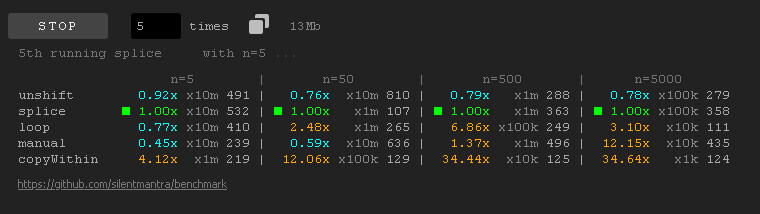
After clicking RUN the tool estimates how many cycles to run each solution so the average time for a solution would be not less than 100ms and runs each solution 5 times by default (you can change it with the times number input). After running you can copy the results as a markup. So the above benchmark gives:
` Chrome/122
------------------------------------------------------
string concat     1.00x | x1000000 399 404 422 435 441
Array::reverse()  3.08x |  x100000 123 124 130 131 139
------------------------------------------------------
https://github.com/silentmantra/benchmark `
The first solution is the fastest which is marked as 1x. The other solutions are marked how they are slower than the top solution. The next column is how many cycles the solution was run, and the next 5 (number of times the solution was run) are milliseconds taken to run the cycles with the minimum time as the first (sorted asc). Basically based on my experience the minimum time is the most presentable value of how good a solution could perform.
You can click and solution and it will marked as 1.00x and other solutions will be recalculated according the selected. To reset the selection just click outside the result table:

You can set the times and cycles manually (sometimes for heavy solutions you could prefer manually setting the cycles to 1):
Algorithms have different time complexity so it's possible to benchmark solutions with different input size. For that we have 3 variables:
$chunk- a chunk from which the input is composed. Could be a string, an array or a function returning either of them.$input- an array or a string to fill with chunks.$chunks- an array of numbers of chunks to run (default[1, 10, 100, 1000]- no need to define).
Let's check with a string:
` Chrome/122
--------------------------------------------------------------------------------
>                   n=122      |     n=1220     |    n=12200    |    n=122000
count smart    1.00x x100k 284 | 1.00x x10k 183 | 1.00x x1k 186 | 1.00x x100 186
count stupid   2.56x x100k 727 | 3.33x x10k 609 | 3.40x x1k 633 | 7.26x  x10 135
--------------------------------------------------------------------------------
https://github.com/silentmantra/benchmark `
A top solution is the best with the most input size.
Note that you could use {} block to create a block scope to run a solution in it to avoid variable clashing.
With a chunk function:
` Chrome/122
------------------------------------------------------------------------------
>                  n=100      |    n=1000     |    n=10000     |   n=100000
count smart    1.00x x10k 172 | 1.00x x1k 191 | 1.00x x100 246 | 1.00x x10 337
count stupid   4.19x x10k 720 | 4.01x x1k 766 | 5.53x  x10 136 | 5.43x  x1 183
------------------------------------------------------------------------------
https://github.com/silentmantra/benchmark `
If you need some code executed before the cycles, use // @run. For example you could introduce a set of functions/classes used in a solution (initializing them in each cycle is expensive and skews results).