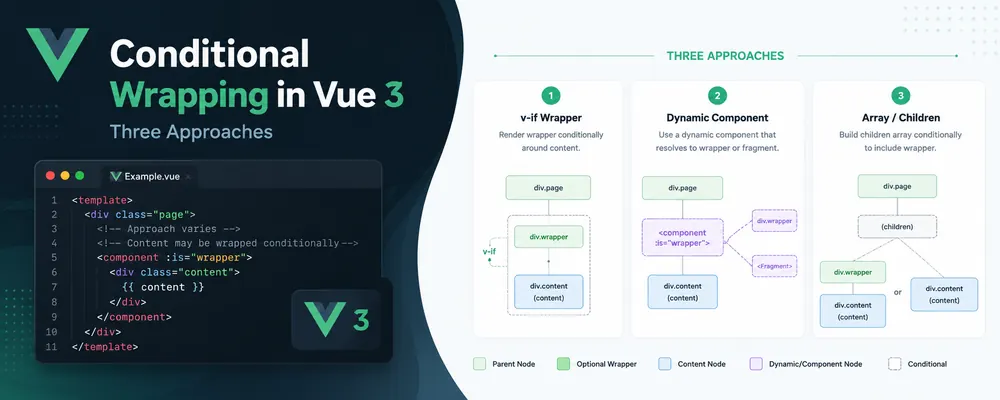
Conditional Wrapping in Vue 3: Three Approaches
Sometimes we need to conditionally wrap part of a Vue template in an additional element or component.
The obvious solution is v-if:
<div v-if="isWrapped" class="wrapper">
    <!-- some big chunk of markup -->
</div>

<template v-else>
    <!-- the same big chunk of markup -->
</template>
It works, but now the content is duplicated.
Let's explore three ways to implement a reusable conditional wrapper in Vue 3 without that duplication.
We'll call our component <Wrap> and the element or component that actually surrounds the content the wrapper.
Since Wrap itself does not need component state, all three implementations can be functional components.
1. Pass the wrapper as a prop
The simplest option is to pass the wrapper element or component as a prop.
Wrap.ts
import { createVNode, type Component, type FunctionalComponent, type VNode } from 'vue';

type WrapProps = {
    wrapper?: string | Component | false;
};

type WrapSlots = {
    default: () => VNode[];
};

const Wrap: FunctionalComponent<WrapProps, {}, WrapSlots> = ({wrapper}, {attrs, slots}) => {
    const content = slots.default();
    return wrapper ? createVNode(wrapper, attrs, content) : content;
};

Wrap.props = ['wrapper'];

export default Wrap;
Usage:
<script setup lang="ts">
import { ref } from 'vue';
import Wrap from './Wrap.ts';

const isWrapped = ref(true);
</script>

<template>
    <Wrap :wrapper="isWrapped && 'div'" class="wrapper">
        <p>I'm conditionally wrapped.</p>
    </Wrap>
</template>
This is the most straightforward and probably the most idiomatic option.
The component either creates a wrapper VNode and puts the default slot inside it or returns the default slot directly.
It also works with Vue components:
<Wrap :wrapper="isWrapped && SomeComponent">
    ...
</Wrap>
For simple cases, this is usually sufficient.
The limitation becomes visible when the wrapper itself is more complex.
For example, if we want several nested wrapper elements, defining them somewhere outside the actual template and passing them through a prop quickly becomes less convenient.
So let's see whether we can keep the wrapper markup directly where it is used.
2. Put the wrapper directly in the default slot
Instead of passing the wrapper through a prop, we can write it directly in the template:
<Wrap :is-wrapped="isWrapped">
    <div class="wrapper">
        <p>I'm conditionally wrapped.</p>
    </div>
</Wrap>
When wrapping is enabled, we return the slot normally.
When it is disabled, we discard the first VNode level and return its children instead.
Wrap.ts
import { type FunctionalComponent, type VNode } from 'vue';

type WrapProps = {
    isWrapped?: boolean;
};

type WrapSlots = {
    default: () => VNode[];
};

const Wrap: FunctionalComponent<WrapProps, {}, WrapSlots> = ({isWrapped = false}, {slots}) => {
    const wrapper = slots.default();
    return isWrapped ? wrapper : wrapper.flatMap(vnode => Array.isArray(vnode.children) ? vnode.children : []);
};

Wrap.props = {
    isWrapped: Boolean
};

export default Wrap;
The template API is arguably nicer because the actual wrapper stays in the markup.
But there are trade-offs.
Vue still creates the wrapper VNode every time, including when we immediately discard it.
The implementation also only understands a one-level wrapper. It assumes that the VNodes returned by the default slot represent the wrapper and that their children are the content we want to expose.
So this is less idiomatic than the first solution and more dependent on the VNode structure generated by the template compiler.
Still, it is an interesting option if keeping the wrapper directly in the markup improves DX enough to justify the additional assumptions.
For arbitrary nesting, however, we need something more flexible.
3. Use a dedicated wrapper slot
Now let's separate the wrapper and the wrapped content into two slots:
<Wrap :is-wrapped="isWrapped">
    <template #wrapper>
        <div class="wrapper">
            <div class="inner-wrapper"></div>
        </div>
    </template>

    <p>I'm conditionally wrapped.</p>
</Wrap>
The default slot contains our actual content.
The wrapper slot contains an arbitrarily nested wrapper tree.
The task is then:
- Build the VNode tree produced by the wrapper slot.
- Find its leaf VNodes.
- Inject the default-slot content into those leaves.
There are two ways to implement this.
3A. Clone VNodes and modify shapeFlag
This is the original approach.
It goes deeper into Vue's VNode representation by cloning the wrapper VNodes and modifying their internal shapeFlag.
Wrap.ts
import { ShapeFlags } from '@vue/shared';
import { cloneVNode, isVNode, type FunctionalComponent, type VNode } from 'vue';

type WrapProps = {
    isWrapped?: boolean;
};

type WrapSlots = {
    default: () => VNode[];
    wrapper: () => VNode[];
};

const Wrap: FunctionalComponent<WrapProps, {}, WrapSlots> = ({isWrapped = false}, {slots}) => {
    if (!isWrapped) return slots.default();

    const wrapper = slots.wrapper().map(vnode => cloneVNode(vnode));

    findLeaves(wrapper, vnode => {
        vnode.shapeFlag = ShapeFlags.ARRAY_CHILDREN | ShapeFlags.ELEMENT;
        vnode.children = [...slots.default()];
    });

    return wrapper;

    function findLeaves(vnodes: VNode[], callback: (vnode: VNode) => void): void {
        for (const vnode of vnodes) {
            const children = Array.isArray(vnode.children) ? vnode.children.filter(isVNode) : [];
            children.length ? findLeaves(children, callback) : callback(vnode);
        }
    }
};

Wrap.props = {
    isWrapped: Boolean
};

export default Wrap;
The important part is:
vnode.shapeFlag = ShapeFlags.ARRAY_CHILDREN | ShapeFlags.ELEMENT;
vnode.children = [...slots.default()];
shapeFlag tells Vue what kind of VNode it is dealing with and how its children should be interpreted.
By explicitly marking our leaf as an element with array children, we can inject the default-slot VNodes directly.
The resulting template API is flexible:
<template #wrapper>
    <section>
        <div class="outer">
            <div class="inner"></div>
        </div>
    </section>
</template>
There is no special representation of the nested wrapper structure. It remains normal Vue template markup.
The disadvantage is that this implementation depends on Vue internals.
ShapeFlags comes from @vue/shared, rather than the public vue package API, and we modify VNode.shapeFlag ourselves.
That does not make the approach invalid. It is compact and gives us direct control over the VNode tree. It is also useful for understanding how Vue represents and processes VNodes internally.
But if this code is expected to survive framework changes over a long period, relying on fewer internal implementation details can be preferable.
3B. Recreate VNodes using the public API
An alternative is to avoid modifying shapeFlag completely.
Instead, we recursively recreate the wrapper tree with createVNode() and let Vue determine the correct internal flags.
Wrap.ts
import { createVNode, isVNode, type FunctionalComponent, type VNode } from 'vue';

type WrapProps = {
    isWrapped?: boolean;
};

type WrapSlots = {
    default: () => VNode[];
    wrapper: () => VNode[];
};

const Wrap: FunctionalComponent<WrapProps, {}, WrapSlots> = ({isWrapped = false}, {slots}) => {
    const content = slots.default();

    if (!isWrapped) return content;

    return slots.wrapper().map(vnode => injectIntoLeaves(vnode));

    function injectIntoLeaves(vnode: VNode): VNode {
        const children = Array.isArray(vnode.children) ? vnode.children : [];
        const childVNodes = children.filter(isVNode);

        if (!childVNodes.length) {
            const injectedChildren = typeof vnode.type === 'string' ? content : {default: () => content};
            return createVNode(vnode.type, vnode.props, injectedChildren);
        }

        return createVNode(
            vnode.type,
            vnode.props,
            children.map(child => isVNode(child) ? injectIntoLeaves(child) : child)
        );
    }
};

Wrap.props = {
    isWrapped: Boolean
};

export default Wrap;
The template-side API remains exactly the same.
The difference is entirely in how the wrapper tree is constructed.
This version has one architectural advantage: it relies on Vue's public VNode construction API instead of explicitly manipulating internal renderer flags.
That makes it potentially more future-proof if Vue's internal VNode representation changes.
The trade-off is that it reconstructs the nested VNode tree rather than cloning the existing wrapper tree and modifying only its leaves.
For a sufficiently complex wrapper tree, this can mean some additional VNode allocations and processing.
In practice, a conditional wrapper usually contains only a few nodes, so the difference is unlikely to be measurable. But it is still a real trade-off rather than a strictly better implementation.
So the two versions represent slightly different priorities:
cloneVNode+ShapeFlags: compact and direct, but coupled to Vue internals;createVNode: uses the public API and may be more future-proof, with a small potential performance cost from reconstructing the wrapper tree.
A limitation of the nested-wrapper approach
Both implementations operate on the VNode tree produced by the wrapper slot.
This works particularly well for a wrapper chain:
<template #wrapper>
    <section>
        <div>
            <article></article>
        </div>
    </section>
</template>
There is one logical leaf, and the content is inserted there.
If the wrapper structure branches into several leaves:
<template #wrapper>
    <div>
        <section></section>
        <aside></aside>
    </div>
</template>
the algorithm finds both leaves and injects the content into both of them.
That means the default-slot content will be duplicated.
This is not necessarily wrong, but it is important to understand the semantics. These implementations are primarily designed for nested wrapper chains rather than arbitrary branching layouts.
Components introduce another boundary.
A component VNode describes which component should be rendered, but it does not expose the final VNode tree that the component itself will eventually produce.
The public-API implementation can provide our content to a component leaf through its default slot, but neither implementation can recursively inspect and modify the component's internal rendered tree from the parent.
Which approach should you use?
There is no universally best conditional wrapper.
The approaches optimize for different things.
| Approach | Template DX | Implementation | Nested wrappers | Vue internals |
|---|---|---|---|---|
| Wrapper prop | Good | Simple | Through another component | No |
| Default-slot wrapper | Very good | Simple VNode manipulation | No | No |
Wrapper slot + ShapeFlags |
Very good | Advanced | Yes | Yes |
Wrapper slot + createVNode |
Very good | Advanced | Yes | No |
For ordinary application code, I would start with the first version:
<Wrap :wrapper="condition && 'div'">
    ...
</Wrap>
It is small, predictable, supports both native elements and components, and stays close to Vue's normal component API.
The second version is useful when keeping the wrapper directly in the template provides better DX and only one wrapper level is required.
The third approach becomes useful when the wrapper markup should remain declarative while supporting arbitrary nesting.
Within that third approach, there is another choice.
If compactness and direct VNode manipulation are important, the cloneVNode + ShapeFlags implementation is elegant.
If minimizing dependence on Vue internals is more important, reconstructing the wrapper tree through createVNode() is a reasonable alternative, with a small potential performance cost for the typical wrapper sizes involved.
A conditional wrapper is a small component, but it provides a useful view into how Vue templates become VNodes and how different component APIs move complexity between the template, the component implementation, and Vue's rendering layer.