For a long time, I treated interface animation as mostly decorative. It could make a product feel more polished or visually impressive, but I rarely considered it functionally important. In fact, I usually preferred to disable animations wherever possible. A dropdown did not seem to need an animation. Smooth scrolling often felt slower than an immediate jump. Waiting for UI motion to finish could feel like unnecessary latency.
Working on more complex interfaces changed my view.
Transitions can be a form of user feedback. When an interaction causes a substantial change in the interface, the developer already knows exactly what happened: which component disappeared, which one replaced it, which panel expanded, and where the new state came from. A user who is still learning the interface does not have that internal model.
An abrupt state change can therefore be difficult to interpret. A transition can preserve visual continuity between the old and new states. When an element moves, expands, collapses, or transforms into another part of the interface, the motion gives the user additional information about the relationship between those states. It helps explain what their action changed and how the new layout relates to the previous one.
That makes transitions part of UX rather than merely visual styling. They can reduce the cognitive cost of navigating an unfamiliar interface and make its behavior easier to learn.
This is one of the reasons I became interested in the View Transition API. It gives the browser a native mechanism for creating complex transitions between DOM states without manually implementing every animation and coordinating the old and new layouts yourself. For me, this changed View Transitions from a visual extra into a useful part of interface architecture.
Once I started using them more extensively, however, a different problem appeared: managing view-transition-name across a large component hierarchy quickly became verbose and difficult to maintain.
That is the problem this article is about.
A Declarative Naming Layer for the View Transition API
The View Transition API is one of the browser APIs I enjoy using most. For simple cases, it is remarkably compact: update the DOM inside document.startViewTransition(), assign a few view-transition-name values, and let the browser handle the snapshots and interpolation.
The complexity changes quickly once the interface contains many independently changing elements.
In a real application, the same element may participate in different transitions depending on the operation. A transition may involve elements distributed across several Vue components. Some elements should inherit a transition namespace from their ancestors, while others should start a new namespace or stop propagation. Multiple independent transition hierarchies may coexist in the same DOM tree.
I initially handled these cases individually, including with coding agents. The individual implementations worked, but the amount of imperative orchestration kept growing: find elements, assign names, coordinate old and new DOM states, wait for Vue updates, remove temporary state, handle dynamic instances, and repeat similar logic for the next transition.
The code was becoming substantially more verbose than the UI behavior it described.
I eventually moved the problem into a separate declarative naming layer.
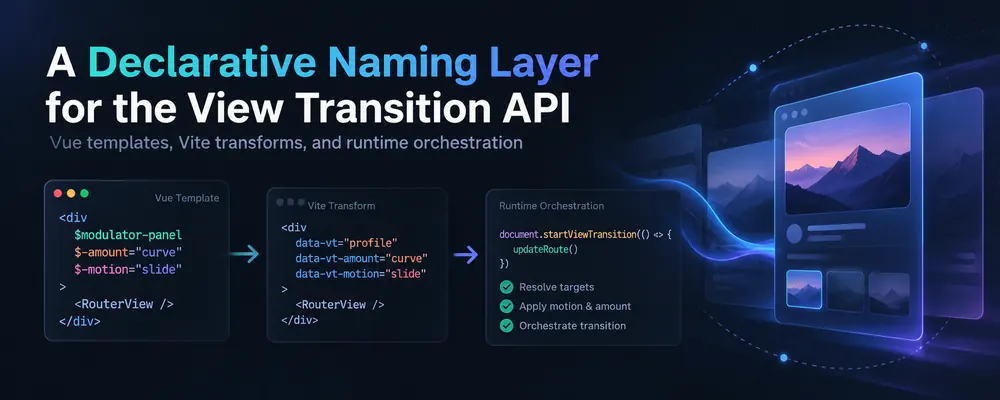
The result is a small internal system used in StereoBV Workshop. View transition participation is described directly in component templates using attributes, while a runtime function activates the required transition hierarchy only for the duration of a transition. Vite compiler transforms, generated TypeScript types, and a VS Code grammar provide the tooling around it.
The browser still performs the actual View Transition. The new layer deals with naming and orchestration.
Moving Transition Identity Out of CSS
A normal View Transition implementation often starts with CSS such as:
.card {
    view-transition-name: card;
}
That works well while an element has one permanent transition identity.
My application needed something more dynamic. A DOM element can participate in one transition when a panel changes, another when a dialog opens, and a more specific child transition when only part of the same UI changes.
Keeping all of that identity in CSS made the relationship between the component structure and transition structure increasingly difficult to see.
I wanted the template itself to answer a simple question:
Which View Transition hierarchies can this element participate in?
CSS could then remain responsible for the visual behavior of the generated View Transition pseudo-elements.
The distinction became important. The attributes in my templates do not directly set view-transition-name. They are persistent metadata describing possible transition relationships. The actual view-transition-name values exist only while a particular transition is running.
First Attempt: Vue Directives
Vue directives initially looked like a natural solution.
Something like this would have been expressive:
<al-panel v-transition="'settings'">
The limitation appeared as soon as the directive was placed on components.
Vue directives used on components are applied to the component root. Unlike fallthrough attributes, they cannot be forwarded to another element with v-bind="$attrs". Multi-root components add further restrictions.
My UI has a deep component hierarchy, including many internal UI components. I needed transition metadata to move naturally through those abstraction layers.
Ordinary attributes already have exactly this property in Vue.
That made attributes a much better transport mechanism.
A Small Attribute Language
The initial attribute names were too verbose. Repeating a long view-transition-* or application-specific prefix throughout large templates made the transition structure visually noisy.
I introduced $ as a source-level marker for View Transition metadata.
A simplified example looks like this:
<al-panel-expandable :$modulator-panel="num">
    <modulation-curve-setting $-motion />
    <al-adjust $-amount />
</al-panel-expandable>
The first attribute establishes a transition family. If num is 2, its resolved name can become:
modulator-panel-2
The child attributes extend the inherited family:
modulator-panel-2-motion
modulator-panel-2-amount
The interesting part is that $-motion contains no knowledge of modulator-panel, the instance number, or the component in which the hierarchy started.
It simply declares its position inside the current transition family.
This makes transition structure composable across components.
Hierarchical Names
The naming layer behaves as a hierarchy rather than a flat collection of unrelated IDs.
A direct attribute starts a family:
<al-panel :$al-setting="targetId">
A descendant can extend it:
<al-slider $-value />
For a target ID of rotation, the runtime can resolve this as:
al-setting-rotation
al-setting-rotation-value
The hierarchy can cross Vue component boundaries because the compiler output consists of normal attributes.
Several transition families can also coexist in the same area of the application. An element can permanently declare metadata for several possible scenarios while receiving only the actual view-transition-name relevant to the transition currently being executed.
This avoids a major practical problem of the native property: a rendered element taking part in a named View Transition has one view-transition-name, and custom names must be unique among participating rendered elements.
My layer therefore treats names as potential roles rather than permanent CSS state.
Controlling Participation and Propagation
The syntax gradually acquired a few compact controls as real cases appeared.
The current model can be summarized like this:
| Source syntax | Meaning |
|---|---|
$panel |
Start or participate in a transition family |
$-value |
Extend the inherited family with value |
:$panel="id" |
Add a dynamic instance value |
$panel! |
Define the transition here without propagating it further |
$panel- |
Establish a family for descendants without making this element participate |
The last two are particularly useful in reusable component trees.
Sometimes a component is only a structural boundary. Its children need a shared transition namespace, while the component root itself should not get its own snapshot. In other cases a transition applies to one level and should stop before unrelated nested UI starts inheriting it.
These controls make that decision part of the template rather than additional JavaScript.
The runtime also supports compact shortcut definitions and the browser's match-element mode for cases where element identity itself should supply the unique transition matching. Internally, the parser resolves all of these forms into the same transition definition model.
The $ Syntax Exists Only During Authoring
I did not want unconventional $... attributes to become the permanent runtime DOM representation.
A Vue compiler transform rewrites them during compilation.
Conceptually:
$modulator-panel
$-amount
becomes runtime metadata in the form:
transition-modulator-panel
transition--amount
Additional marker attributes are generated when propagation or parent-only behavior is requested. The transform operates on the Vue compiler AST, including both static attributes and static v-bind argument names.
For example, the source-level ! suffix becomes an internal --no-propagate marker, while a trailing - on a named family produces a --parent-only marker. vite-plugin-vue-transition-attr…
This gives me two representations with different purposes.
The source representation is optimized for developer experience:
$modulator-panel
$-motion
$-amount
The DOM representation is explicit and conventional enough for runtime inspection:
transition-modulator-panel
transition--motion
transition--amount
Runtime Orchestration
All imperative orchestration is concentrated in one startTransition() function.
Application code can start a transition by name:
await startTransition(`al-setting-${targetId}`, () => {
    dialogTarget.value = target;
});
It can also start from a DOM element:
await startTransition(panel, () => {
    item.amountCurveOn = value;
});
The second form is useful when the caller does not need to know the hierarchy name. The runtime examines the element and its subtree and determines which declared transition names belong to it.
Multiple prefixes can also be supplied to activate several declarative hierarchies during the same View Transition.
Internally, startTransition() performs the lifecycle that I previously had scattered across individual features.
Before calling document.startViewTransition(), it resolves the requested prefixes and temporarily assigns viewTransitionName to matching elements. During the update callback it performs the application state change, waits for Vue's nextTick(), removes the old assignments, scans the updated DOM, and assigns names again for the new state. After the browser reports the transition as finished, all temporary names are removed.
The second scan is important. A transition frequently changes which elements exist. The old snapshot and new snapshot therefore cannot rely on a single static set of DOM nodes.
The declarative attributes remain stable metadata. The runtime derives the correct active names independently on both sides of the DOM update.
Prefix matching provides another useful property. Starting:
startTransition('modulator-panel-2', update);
can activate the family rooted at that prefix, including more specific descendants such as:
modulator-panel-2-motion
modulator-panel-2-amount
The runtime performs that matching centrally instead of requiring every call site to enumerate all participating elements.
Keeping CSS Generic
The system also assigns a shared view-transition-class to participating elements.
This allows generic snapshot behavior to remain very small:
::view-transition-old(.view-transitioned),
::view-transition-new(.view-transitioned) {
    width: 100%;
    height: 100%;
    object-fit: fill;
}
view-transition-class is designed exactly for this kind of shared styling: unlike view-transition-name, the class does not need to be unique and can style multiple named transition pseudo-elements. MDN Web Docs
Specific transitions can still have their own CSS where required. The naming, hierarchy, selection, and lifecycle no longer have to be encoded there.
Editor Tooling Became Part of the Design
Once transition metadata moved into templates, another problem became obvious: attributes disappear visually inside large Vue files.
I wanted transition structure to be immediately recognizable while reading a component.
I added a tiny VS Code extension with a TextMate grammar that highlights $... transition attributes separately from ordinary attributes. The grammar is injected directly into Vue template syntax. transition-attributes.tmLanguage package
This turned out to be more valuable than I initially expected.
When opening a large template, I can visually scan the transition structure without tracing JavaScript. Parent families, child segments, and dynamic transition bindings stand out immediately.
The transition layer became visible as part of the component architecture.
Generating Transition Names and Types
The next step was eliminating manually maintained name lists.
A second Vite plugin scans Vue files, parses each SFC with @vue/compiler-sfc, parses the template with @vue/compiler-dom, walks the AST, and collects $... transition names. It runs initially and again when Vue files are added, changed, or removed. vite-plugin-transition-names
It then generates a TypeScript source file:
export const transitionNames = [
    'al-setting',
    'modulator-panel'
] as const;
That generated constant feeds the runtime type:
type TransitionPrefix = typeof transitionNames[number] | `${typeof transitionNames[number]}-${string}`;
As a result, creating a new transition family in a template automatically makes the name available to TypeScript autocomplete at startTransition() call sites. The same generated information also catches many naming mistakes during development.
There is no separate registry to remember to update.
The template is the source of truth.
The Real Production Case
This system grew out of StereoBV Workshop rather than an isolated animation experiment.
A single modulation component already contains several examples: dynamically identified modulator panels, motion and amount children, target settings, slider values, dialog transitions, and transitions started both from DOM elements and from explicit hierarchical prefixes.
That is the kind of component where a collection of one-off View Transition implementations becomes difficult to maintain. Several independent UI operations coexist, and each operation may involve a different subset of the same component tree.
With the naming layer, most of that information remains close to the markup.
The behavioral code describes the state update.
The template describes transition participation.
The runtime connects the two.
This Is Not Fundamentally Vue-Specific
My current implementation is integrated deeply with Vue because StereoBV Workshop uses Vue. The compiler transform uses Vue's compiler packages, the generated-name plugin scans .vue templates, and the transition runtime waits for nextTick() before resolving the new DOM.
The underlying model is framework-independent.
The browser only sees DOM attributes and document.startViewTransition().
A React, Svelte, Web Components, or plain HTML implementation could use the same architecture with a different authoring transform and a framework-appropriate mechanism for waiting until the DOM update completes.
The important part is the separation between persistent declarative metadata and temporary native View Transition state.
What I Learned From Building It
The View Transition API itself remained small throughout this process. Most of the engineering work appeared around naming, composition, lifecycle, discoverability, and developer tooling.
For isolated transitions, direct view-transition-name declarations are sufficient.
For a larger application, I found it much more manageable to treat transition participation as its own declarative application layer.
The final workflow is now straightforward: mark potential participants in the template, compose them into hierarchical namespaces, start a transition from a typed prefix or DOM element, and let one runtime function assign and clean up the browser state.
Vite handles the source transformation and name discovery. TypeScript provides autocomplete and validation. The editor makes the structure visually recognizable. CSS focuses on the resulting animation.
This changed View Transitions in StereoBV Workshop from feature-specific imperative code into reusable infrastructure.
And, more importantly for a growing UI, adding the next transition no longer requires inventing another orchestration mechanism.
A Useful Side Effect: Agent-Friendly Transitions
A pleasant side effect of this architecture is how well coding agents work with it.
Once an agent is told that $... attributes describe View Transition participation, it can usually extend fairly complex transitions without needing to understand the runtime implementation. For many tasks, the instruction can be as small as: use the $ transition attributes to connect these elements into the same transition hierarchy.
Even transitions involving several components and multiple moving elements can often be implemented without adding feature-specific JavaScript or CSS. The shared runtime already handles name resolution, DOM updates, View Transition lifecycle, and cleanup.
This also makes agent-generated changes much easier to review. Instead of inspecting a new block of transition-specific JavaScript together with additional CSS selectors and animation rules, I can often review only a few attribute changes in the template. The transition structure is visible directly in the markup, and the diff stays small.
In practice, modern coding agents handle this declarative syntax very well. Once the pattern exists in the codebase, they can infer the hierarchy from nearby examples and produce complex multi-element transitions with surprisingly little guidance.
For me, this has become another argument for moving repeated UI behavior into declarative infrastructure: it improves developer experience for humans, and it also gives coding agents a much smaller and more constrained surface to modify.